Creating and Using QR Codes
QR codes (Quick Response codes) are two-dimensional barcodes that can store a variety of information, such as URLs, text, contact cards, or even a modern-day beggars cup (Bitcoin address).
Originally created in 1994 by Masahiro Hara for use in the automotive industry, they’ve since become commonplace in catalogs, restaurants, factories, and anywhere else you need to cram some data into a small place. If you pay attention, you’ll see them everywhere.
They can be scanned using smartphones or QR code readers to display information or take an action like sending you to a website or connecting you to a Wi-Fi endpoint.
They are fascinating bits of technology and will usually still work (due to built-in error correction) even if some part of the QR code has been destroyed. If you are even remotely interested in how they are constructed, then reading through Thonky's QR Code tutorial is a great place to start.
Creating a QR Code
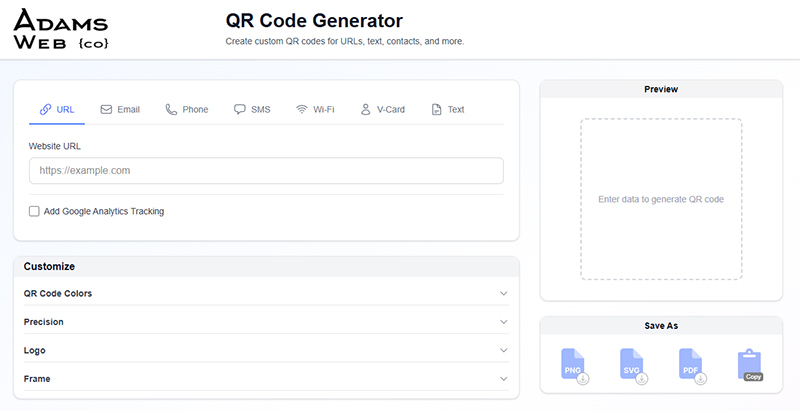
QR code creators and plugins are widely available online and are extremely easy to use. Some allow you to change the style of the QR Code, overlay a logo in the center, or customize the colors all from one interface.
If you are a coder, there are existing libraries for most programming languages allowing you to integrate QR codes very easily into your website or software.
Using a QR Code
For the love of all that is holy and pure in this world, please don’t email someone a QR Code that only has a URL. Just email the link…
Some common uses of QR codes include:
- Linking to a website or social media profile
- Sharing contact information (vCard)
- Providing Wi-Fi access details
- Making payments (Bitcoin, PayPal, etc.)
- Event ticketing
- Product tracking and inventory management
To scan a QR code, you can use your smartphone's camera app (most modern smartphones have built-in QR code scanning capabilities) or a dedicated QR code reader app. Simply point your camera at the QR code, and it will recognize the code and prompt you with the relevant action, such as opening a URL or displaying text.
Things to Remember
Contrast and Spacing Matter
Ensure there is sufficient contrast between the QR code and its background to make it easily scannable. Typically, a dark code on a light background works best. Also, make sure there is enough white space (quiet zone) around the QR code to help scanners recognize it.
Test Your QR Code
Before sharing or printing your QR code, always test it with multiple devices and QR code scanning apps to ensure it works correctly and leads to the intended destination.
Updateability
Once a QR code is printed or shared, it’s difficult to change the information it contains. If you need to update the information, you’ll have to create a new QR code which could be problematic if the original code has already been widely distributed.
If you are using QR Codes to send people to a website, a good workaround is to use a URL shortener or a dynamic QR code service that allows you to change the destination URL without changing the QR code itself.
This works by embedding a short URL in the QR code which then redirects to the actual content. For even more security, buy your own domain name and use that domain with the short URL service.